
How to Access Your Software Bonuses & Inner Circle Membership
Your Embroidery Legacy software purchase comes with bonus training, designs, and resources to help you learn, create, and level up your embroidery skills. Everything is already active — you just need to know where to find it.
We’ve organized your bonuses into two main areas:
- Training & Education — where you learn how to use your software effectively
- Design, Fonts & Creativity Boosters — extra content to inspire and enhance your projects
Training & Education
Step 1: Beginner to Intermediate Lessons (Skool)
Skool hosts beginner → intermediate lessons and community support to help you get started confidently with your software.
✨ Your learning journey starts here: Guided step-by-step lessons, insider tips, community support, upcoming live Q&As, and hands-on exercises designed to accelerate your skills — giving you the confidence to create professional-level embroidery projects faster than you ever imagined!
- Access your structured training and community in Skool here: Embroidery Legacy Skool Group
- More details are also available in our dedicated Getting Started with Skool Guide
- Use the same email address you purchased with
- Approval usually takes up to 72 hours
💡 Tip: Start in Skool to learn the basics, then move to advanced Masterclasses in your account classroom.
Step 2: Advanced Lessons & Masterclasses (Account Classroom)
Once you’ve mastered the basics, your advanced Masterclasses are available inside your account Classroom. These cover software-specific advanced techniques and bonus tutorials.
✨ Take your skills further: These deep-dive lessons give you hands-on guidance from award-winning digitizers, teaching techniques and skills you won’t find anywhere else. You’ll go beyond the basics, learn how to create whatever you imagine, and even vote on or request topics for future lessons — turning you from a beginner into a confident, unstoppable digitizer.
How to Access Your Masterclasses
👉 Click here to view your masterclasses.
OR
- Log in to your account at 👉 https://embroiderylegacy.com
- Go to Classroom
-
Click the “EL Software” tab
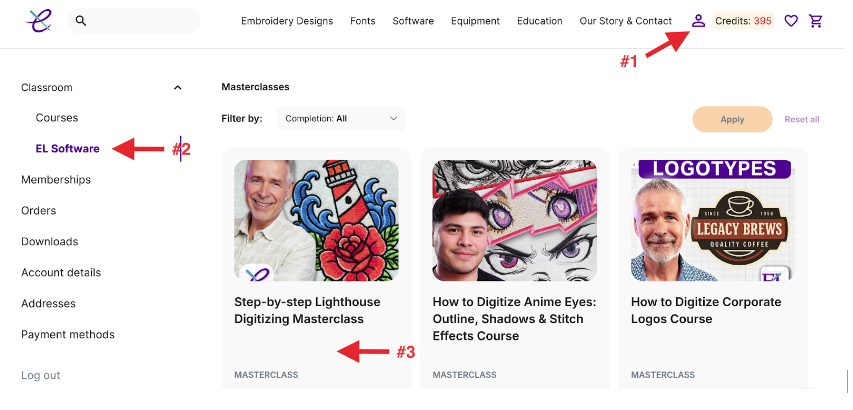
Inside this area, you’ll find:
- Advanced software lessons
- Bonus Masterclasses tied to your software
- Extra resources to help you level up
💡 New Masterclasses are added each month — check back to see the latest content.
Design, Fonts & Creativity Boosters
Step 3: Inner Circle Design Club
Your software purchase includes Inner Circle membership, which provides monthly design credits, fonts, projects, and bonus downloads.
✨ Boost your creativity: These bonuses are carefully curated to spark your creativity, elevate your projects, and give your embroidery the “Wow factor” — all designed to complement your learning and help you make professional-quality designs.
How to Access Your Design Club
- Log in to your account
- Click Membership
-
Select Inner Circle Design Club
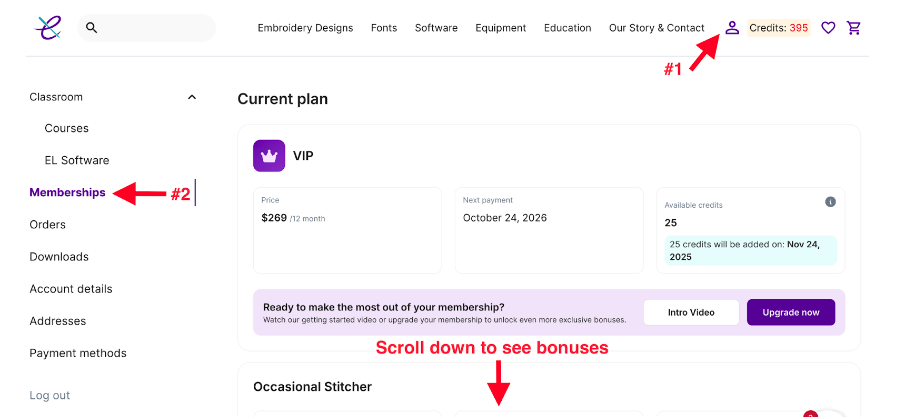
Inside this area, you can:
- View membership details
- See your remaining design credits
- Access your monthly bonuses (including your bonus fonts, in-the-hoop projects, design packs, and more!)
👉 Click here to access your monthly fonts.

How to Use Your Design Credits
-
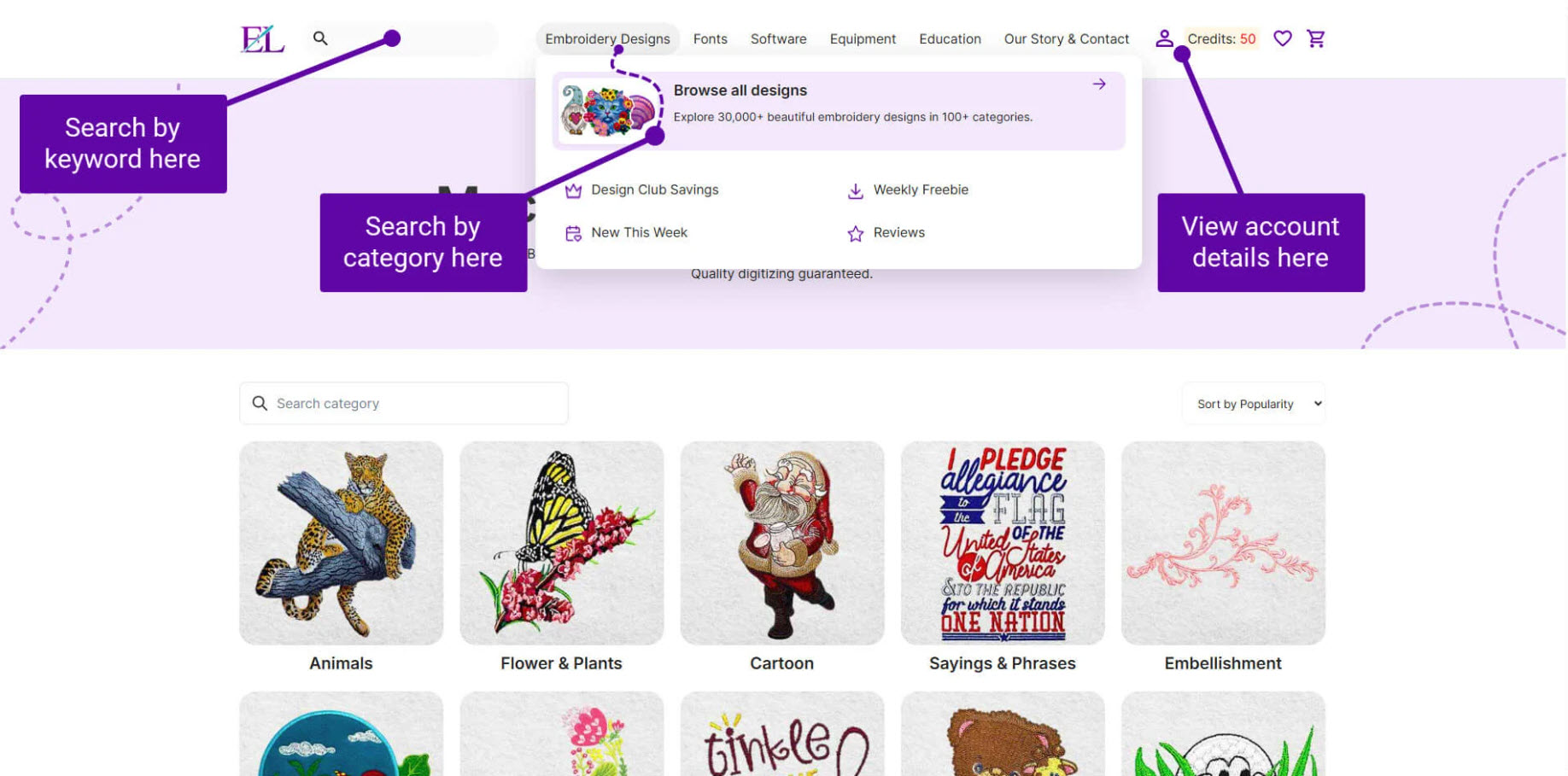
Browse or search our massive library of 30,000+ embroidery designs, fonts, in-the-hoop projects and more by visiting the embroidery design categories page, or by using the search bar at the top left-hand corner of the site:
Click into a product page
Below the “Add to My Collection” button (only if logged into your account), you’ll see:
- Credits required
- “Download with Credits” button
-
Click Download with Credits
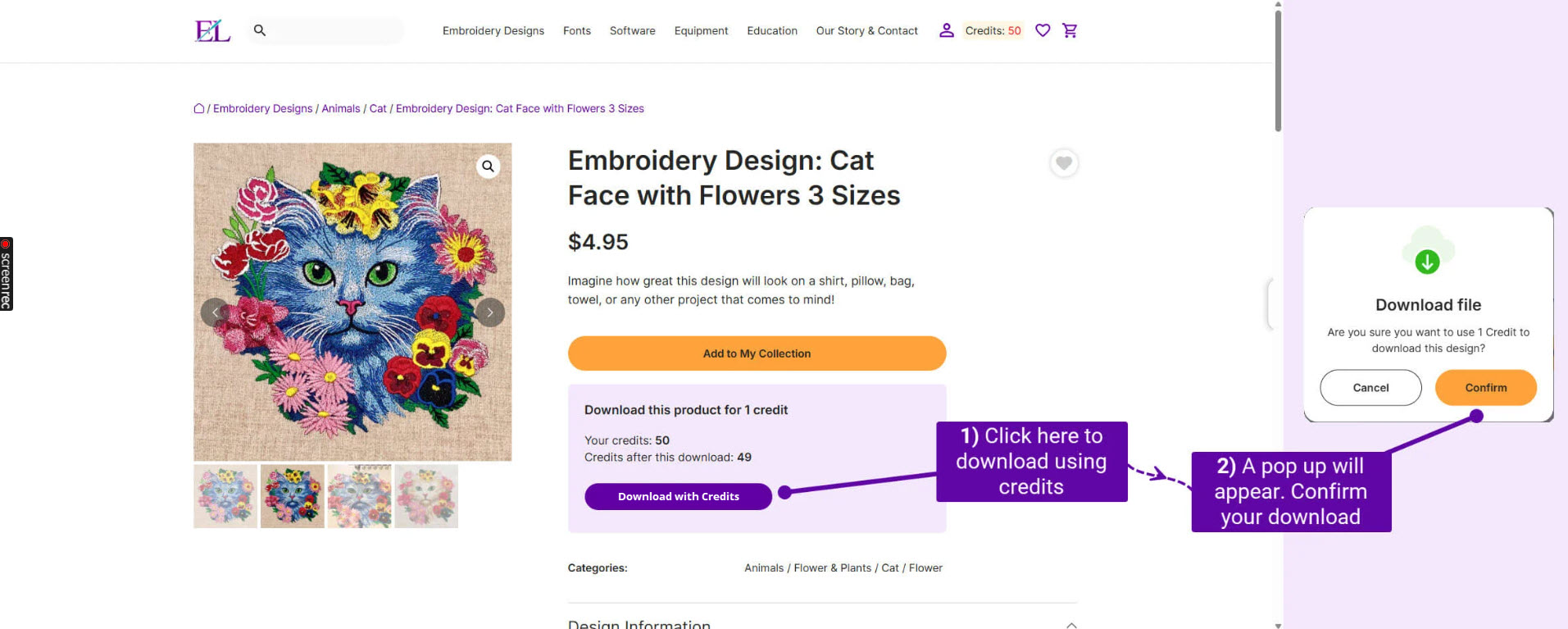
Files will download to your computer’s Downloads folder.
💡 Pro digitizing tip: When downloading designs with your credits, take a minute to see how each design was digitized. Whether in your software or by watching it stitch out, you can dissect how each design was created — helping you think more like a professional digitizer and improve your own work faster.
📌 Full step-by-step guide: How do I use my Embroidery Club membership?
Access Duration & Expiration
- Skool access never expires — you can revisit lessons anytime and are a part of our community for life.
- Your bonus Masterclasses and Inner Circle Design Club membership are available for the period included with your purchase.
These bonuses are a special gift included with your purchase and represent a lot of time, expertise, and care each month to create. We hope you enjoy them so much that you’ll be inspired to continue your learning and creativity by joining the Inner Circle again once your bonus period ends.
💡 Important: Renewal is completely optional, and there are no automatic charges — you’re in full control.
Common Questions
❓ Is my software permanent?
Yes — the software is yours to keep and will continue working even after your bonus access ends.
❓ Do I access bonuses inside the software?
No — bonuses and training are accessed via your online account, not inside the software itself.
❓ Where can I get more help with accessing my bonuses?
Email [email protected] with:
- What you’re trying to access
- What email you purchased with
We're always happy to help and are here for you every step of the way 😊